RCFE guide
California RCFE software for daily care and inspection readiness.
Before you choose software for a California residential care facility for the elderly (RCFE), check what records it holds, how it helps at an inspection and what the vendor can show you.
Written by one of our founders · 6 min read
01
What RCFE software should do.
RCFE software is one app for the care and the paperwork of a licensed home. What staff record during the day is what you, your licensing analyst (LPA) and approved family see later.
One resident day
Medications, meals, vitals, tasks, notes and care-plan work stay on the resident’s record.
The whole home
Staff credentials, emergency records, consents and readiness evidence stay with the home they belong to.
02
Five things it should hold in one place.
Meds, daily care, staff files, drills and family updates belong in one app. That matters most when something slips, like a missed dose or an expiring Live Scan, and you need to find it fast.
- The med pass
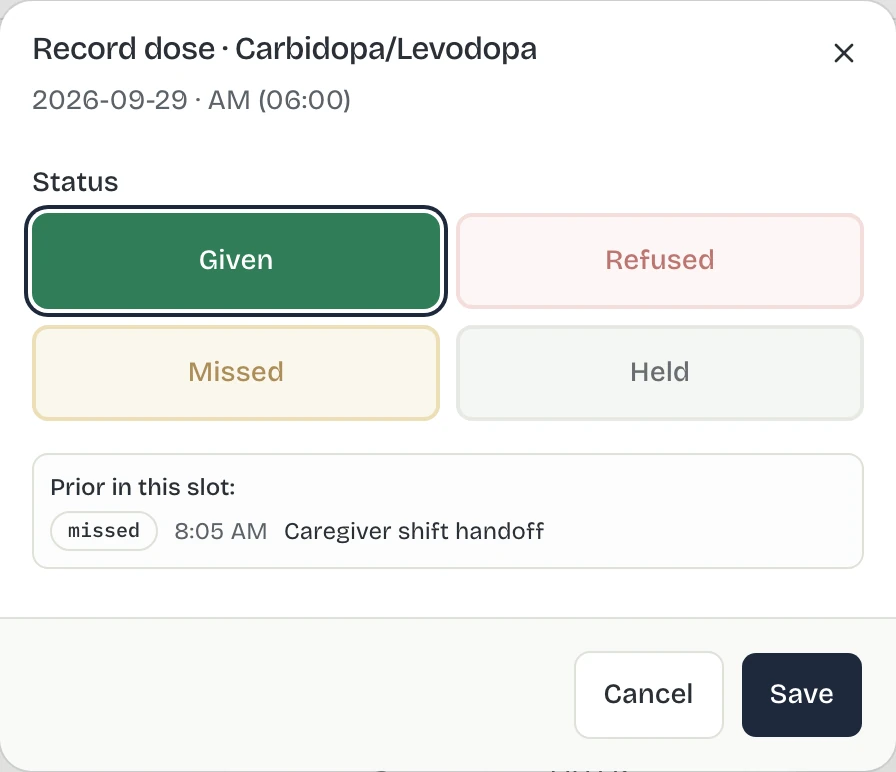
- Record each dose on the MAR as it is given. A missed dose takes a reason, a new order waits for review and a PRN keeps its response.
- Daily care
- Bathing, dressing, toileting and transferring (the activities of daily living, or ADLs), plus meals, vitals, tasks and notes on the resident’s day.
- Staff records
- Track credentials already on file, including Live Scan and RCFE administrator certification, and see which are current, about to expire or expired.
- Emergency readiness
- Keep each home’s drills, facility resources, evacuation destinations, transfer contacts and supporting records together.
- Family communication
- Share approved updates from the care record instead of asking staff to write the day twice.
03
Be ready when your LPA walks in.
The state can visit any day without notice. A readiness view should show what is missing today and open the file that fixes it.
California requires at least one unannounced inspection each year (Health and Safety Code § 1569.33).
Sevana organizes records you would show at an inspection. It does not determine compliance or replace facility policy and legal guidance.
- Resident recordsResident files complete1 resident missing required documents.Fail
- Care plansPlans reviewed in last 90 days1 care plan overdue for review.Warn
- TeamStaff credentials current2 staff credentials expire in the next 30 days.Warn
- FacilityEmergency resources operational1 resource flagged not operational.Warn
- 5 more checks, all passingPass
04
Vendor evaluation
Questions to ask before choosing a system.
Ask to see each answer in the product. One resident day, one exception and the record behind it will tell you more than a feature list.
Will my caregivers write the same thing down twice?
Have the vendor record one 8 a.m. med on a caregiver’s screen. Then ask to see that dose in the MAR, in the resident’s day and in what the family sees. If anyone has to copy it from one place to another, the answer is yes.
If a med gets missed, how will I find out?
Ask the vendor to skip one 8 a.m. dose and show you where it turns up. Then ask the same about a Live Scan that is about to expire. You should find both without hunting for them.
When a chart looks wrong, can I see who changed it?
Pick one dose and one care note. Ask who entered it, who changed it afterward and when. The answer should be on the screen. It is what you point to when a caregiver gets blamed for a hole in the MAR.
Who can open my residents’ charts, and who can’t?
Ask the vendor to sign in as a caregiver, then as a family member, and show you what each one can open. A caregiver should see only the homes they work in. A family member should see only the resident named in their signed authorization, and only what that resident or their legal representative turned on.
If I leave, do I get my records back?
Ask what you can print or export today, how long the vendor keeps your records and what you walk away with the day you cancel. Ask for a real export of one resident’s file before you sign.
05
Start with the records you already have.
Switching should not mean your staff retype every binder, or that your files have to be tidy first.
Bring what you have
Start with your census, current MAR, staff list and the records you already keep.
We load it with you
We load your census and MAR with you, as they are.
See your first gaps
After the first review you see what is missing. We confirm what still needs to move and plan the rest of the setup with you.
06
California RCFE software FAQ
Questions owners ask.
What is RCFE software?
RCFE software keeps the records of a California residential care facility for the elderly (RCFE), also called a board and care home, in one place: resident care, medication records, staff files, emergency drills, facility resources and evacuation destinations. Sevana keeps the resident’s day and the home’s records in one app instead of paper in three places.
Does Sevana support Title 22 inspection readiness?
Sevana organizes the daily records owners use to get ready for an inspection: MAR coverage, care plans, credentials such as Live Scan and RCFE administrator certification, consents, drills and the resident file. LIC 601, LIC 602A, LIC 603A, LIC 613C-2, LIC 621 and LIC 627C are kept per resident, and centrally stored medication records print as LIC 622. It does not replace your policies or legal guidance.
Can Sevana manage medication administration records (MAR, eMAR)?
Yes. Each MAR cell records the dose and who gave it. An unrecorded dose turns overdue when its window closes. A missed dose takes a reason. New orders wait for review, and PRN administrations keep their response.
Can we move from paper, or another system?
Yes. Bring your census and MAR as they are and we load them with you. Timing depends on the census and files you bring, so we confirm the plan after the first review.
How is resident data protected, and who owns it?
You own your data. Every change is logged with who made it and when, and the log is sealed so a later edit shows. That log is your audit trail. Staff see only the homes they work in. A family member sees only the resident named in their signed authorization. Data is encrypted in transit and at rest.
What does Sevana cost?
Your first month is free. After that it is $14.99 per month for each occupied bed, counted on the residents in your home rather than the capacity on your license, and prorated to the day when someone moves in or out. Every feature is included, and there is no higher tier.
See it running on your own home.
Bring the records you use today and we will walk through them with you. Or open the sample home first, no account needed.